
When it comes to building a website or web application, developers have two technologies to choose from: web servers and application servers. They may be closely connected but they are not the same. More often than not, these technologies are used interchangeably. However, it is worth noting that these two technologies are meant to serve different purposes and handle different tasks. Knowing the difference helps you make better technology decisions. Keep reading this post if you want to know those differences. In this article, we have explained the key differences between web servers and application servers in detail. Let’s get started…
Web Server – What Exactly It Is?
A web server is software, and sometimes the hardware it runs on, that receives requests from web browsers and delivers website content. Its main job is to serve files such as HTML pages, CSS, JavaScript, images, videos, and other static resources. Whenever a user types a website address into a browser, that request first reaches a web server. The web server then locates the requested files and sends them back. The same file is then displayed as the webpage on the browser. Modern web servers are designed to even send requests for dynamic content to an application server.
⇒ Key Responsibilities of Web Servers
Web servers handle some of the important functions, such as:
- Delivering static website files quickly
- Accepting and processing HTTP and HTTPS requests
- Managing multiple user requests at the same time
- Handling SSL/TLS encryption for secure connections
- Supporting caching to improve loading speed
- Compressing files to reduce bandwidth usage
- Acting as a reverse proxy by forwarding requests to application servers
- Providing logging and basic security features
- Maintaining speed and high performance
Application Server – What Exactly It Is?
An application server is software that runs applications. They perform complex processing before actually sending results back to users. Application server does not simply deliver files; in fact, it executes business logic, communicates with databases, manages user sessions and generates dynamic content.
So, whenever you place an order on an e-commerce platform or maybe log into your banking site first the request is processed by application server. Application server verifies login credentials, checks available products, calculates totals, communicates with databases and after all this, sends the appropriate response. In a way, an application server acts as the “brain” behind modern web applications, handling its logic and processes.
⇒ Key Responsibilities of Application Servers
Here are some of the key functions that application servers take care of. Take a look…
- They execute application code.
- They even process business rules and workflows
- Application servers connect with databases
- They generate dynamic web pages
- They also take care of user authentication and authorization
- They manage sessions and transactions
- They support APIs and backend services
- Lastly, they integrate with third-party applications and enterprise systems
All in all, application servers’ main job is to process data. Read ahead to know the key differences between these two technologies. Here we go….
Web Server vs Application Server: Key Differences
Both servers work together in many systems but their purpose and tasks are absolutely different. Here is a detailed comparison; take a look….
➦ Primary Function & Role
Primarily they differ based on their purpose and functions. A web server mainly receives requests from browsers and delivers website content. Basically, it acts as the entry point between users and a website. Web server delivers the homepage of a website when a user requests for it.
An application server, on the other hand, performs data processing to generate responses. It runs application code, executes business logic and interacts with databases. All in all, an application server processes login requests, payment transactions or product searches.
➦ Content Handling (Static vs Dynamic)
The way these two technologies handle content also differs. Web servers are designed to handle static content, such as HTML pages, CSS files, JavaScript files, Images, Videos, Documents and so on. These files already exist; web server simply finds and sends them to users.
Application servers are designed to generate dynamic content. They don’t send existing files; they are designed to create responses based on user requests. Some of the examples include, displaying personalized dashboards, processing online payments, showing available flight tickets, updating shopping carts, generating reports and so on. Responses vary greatly based on the user’s data or actions.
➦ Architecture and Processing
Even the internal architecture of both servers also differs significantly. Web servers have simple and lightweight architecture. This ensures basic tasks, such as receiving request, locating files and responding quickly become easier. The lightweight architecture allows it to serve thousands of users efficiently and perform its best at all times.
An application server, on the other hand, carries a much more complex architecture. This is because they handle complex tasks, such as running application code, handling multiple business processes, executing transactions, accessing databases, processing API requests and so on. When a user makes a request, the system performs several steps before sending a response.
For instance, when you place an online order on an eCommerce platform, several steps follow, including:
- Verifying user identity
- Checking product availability
- Calculating taxes and discounts
- Processing payment
- Updating inventory
- Finally, generating order confirmation
That’s why application servers have more complex architectures and handle more complex tasks than web servers.
➦ Performance & Scalability
Performance is another key difference between the two. Web servers are designed to deliver existing files, which makes it easier for them to deliver faster performance. They mainly require fewer computing resources.
Application servers perform complex tasks and each request undergoes a proper process before actually delivering the response. Every request involves, database queries, business logic execution, API communication, authentication checks and data validation. And when the number of users grows, application servers require more CPU power and memory.
So far scalability is concerned, web servers are easy to scale. Only by adding more servers increased traffic can be handled effortlessly. Application servers; however, require more resources and proper scaling strategies to handle complex tasks and business logic.
➦ Protocol Support and Integration
Then comes protocol support and integration. Web servers primarily support web communication protocols such as, HTTP, HTTPS, HTTP/2, HTTP/3, WebSocket and so on to efficiently communicate between browsers and websites.
Application servers, on the other hand, support web protocols as well. However, they also work with additional technologies required for enterprise applications, such as database connections, remote procedure calls, messaging services, REST APIs, SOAP services, authentication systems, cloud services and enterprise integrations. This makes it easier for application servers to connect multiple business systems and backend services.
How Web Servers and Application Servers Work Together
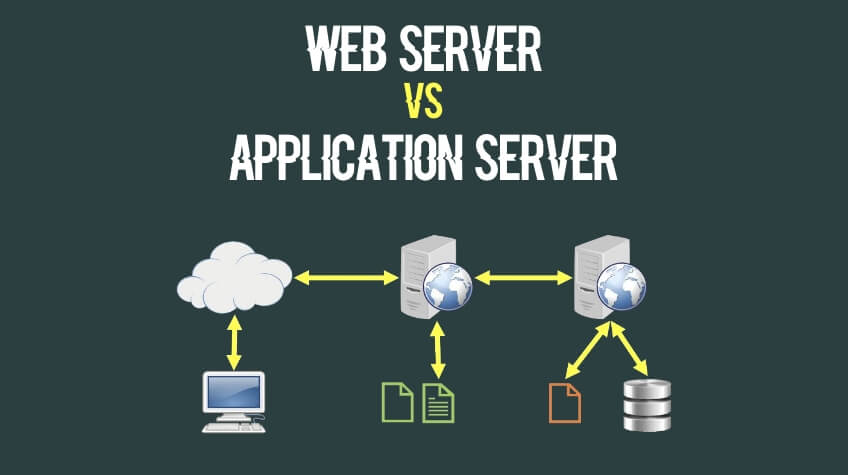
Although these two technologies are different and are designed to serve different purposes, they even operate as part of the same system.
Basically, it depends on the kind of request has been made. For instance, if the user has made request for a static content, then the request reaches the web server. However, if the same request requires processing, such as logging in, searching products or retrieving account information. The web server then forwards the request to the application server. The application server processes the request, communicates with databases accordingly and returns the result to the web server and sends the final response to the user’s browser. The working of these two technologies together ensures personalized experiences for users.
Popular Web and Application Servers
Some of the widely used web and application servers include:
🢧 Apache HTTP Server and NGINX
Apache HTTP Server is one of the world’s most popular open-source web servers, known for its flexibility, extensive module support and compatibility with various operating systems. NGINX, on the other hand, is recognized for its high performance, low resource usage and ability to handle large numbers of simultaneous connections. Also, it is used as a reverse proxy and load balancer.
🢧 Apache Tomcat and Zend Server
Apache Tomcat and Zend Server are again popular. Apache Tomcat is a popular application server designed specifically for running Java-based web applications. It supports Java Servlets and JavaServer Pages (JSP). This makes it a reliable choice for enterprise software. Zend Server, on the other hand, is built for PHP applications. It mainly popular for its application monitoring, debugging tools, performance optimization and easier deployment for PHP-based websites and business applications.
The Bottom Line
So, there you have it: the key differences between web server and application server. Both web and application servers ensure excellent modern web experiences. A web server is designed to server website content and handle browser requests, while an application server is created to manage the complex processing that powers dynamic applications. These two even work together to deliver personalized experience and ensure enhanced performance. Together, they provide the speed, reliability and functionality users expect from modern websites and online services. Knowing the differences between these technologies can help you better understand how modern websites work and take the right route.