
AI is rapidly transforming the way codes are developed. Among several AI-powered tools, Claude Code has become pretty popular for its impressive ability to understand context, generate accurate code and assist developers with real-time problem-solving across a wide range of programming tasks. Whether you want to build a startup MVP, automate repetitive tasks, or just want to debug faster, Claude Code is one of the best tools to rely on. This tool uses natural language to generate, debug and optimize code more efficiently. In addition, it simplifies complex tasks, accelerates development and enhances productivity, which makes it one of the most valuable tools for programmers. If you want to learn more about Claude Code, then read this post. Here, we have explained everything about this powerful tool in detail, along with its uses and real-world examples. So, without any further ado, let’s get started…
Understand Claude Code – What Is It?
Claude Code is an AI-powered coding assistant. It is specifically designed to help developers/programmers write, understand, debug and optimize code. It uses natural language. It helps developers save a lot of time that they might otherwise spend on searching through documentation or forums. With Claude, you can simply describe what you want and get desired results. This is because Claude generates or improves the code for you based on your instructions.
In a way, Claude acts as your collaborative coding partner. It is designed to understand multiple programming languages, helps with logic building and debugging, explain complex code in simple terms and suggest improvements and optimizations. So, in all, Claude Code goes beyond syntax; it understands intent, which is not possible with traditional autocomplete tools.
Claude Code – How it Works?
Claude Code uses advanced language models that are trained on large datasets of programming knowledge. You interact with it through prompts, just like you do when chatting. Here is an example: “Create a responsive login page using HTML, CSS, and JavaScript with basic validation.”
Claude Code not only generates code, but also it explains how it works. This comes in handy for learning and validation. However, it depends mainly on the prompts you give to generate code.
Here is How Claude Works:
Using Claude Code is very easy and straightforward. All you have to do is to:
- Define your task clearly: Vague prompts lead to vague outputs. Therefore, being specific is crucial to get the best results.
- Provide context: Make sure to mention the programming language, framework or constraints for the best outcomes.
- Iterate: When providing prompts, take it like a conversation. Keep refining your prompt as needed.
Example Prompt: “Write a Node.js script using Express to create an API endpoint that returns a list of users.”
Writing a clear and concise prompt will allow you to get functional code, clean structure along with optional improvements or notes.
Read ahead for the real-world examples of Claude Code. Here we go…
Real-World Use Cases
Here are some of the real-world uses cases of Claude Code to help you understand how it is used in everyday development. Take a look…
1. Rapid Prototyping

Claude Code comes in handy when it comes to rapid prototyping. Using this AI tool, you can quickly build prototypes. For instance, you want to a login system for a demo.
The right prompt might include: “Create a basic login system using React for frontend and Node.js for backend with JWT authentication.”
Upon receiving the prompt, Claude Code will generate Frontend login form, Backend authentication logic and Token handling.
This will save you a lot of time that you will otherwise spend in setting up a working foundation.
2. Debugging Code
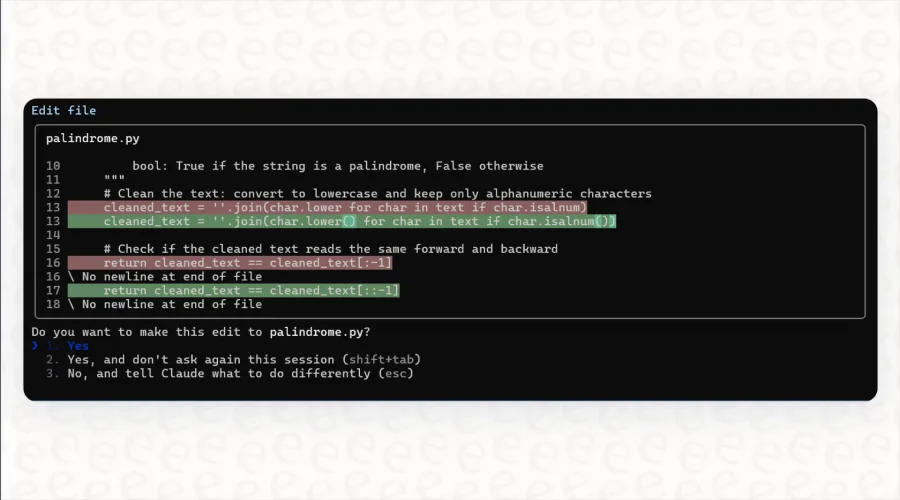
Besides rapid prototyping, Claude Code is also used for debugging. You very well know that debugging is one of the most time-consuming parts of development. However, with Claude Code it all becomes a breeze. For instance, if you want to figure out what’s wrong with your Python script as it is showing an error.
The right prompt may include: “Here’s my Python code. It throws a ‘KeyError’. Can you identify the issue and fix it?”
Then, paste your code, and Claude Code will instantly identify the root cause, suggest you appropriate fixes and even explain why the error occurred in the first place.
This will save you a lot of time that you would otherwise spend in detecting and fixing the error.
3. Code Refactoring
Claude Code is also used for refactoring messy codes. For instance, you have a long, unstructured JavaScript function. Now, you want to refactor it, the ideal prompt will be: “Refactor this function to make it more readable and modular.”
Upon receiving the prompt, Claude Code will instantly break down large functions, improve naming conventions and apply best practices. This allows developers to maintain clean and scalable codebases.
4. Learning New Technologies
Claude Code not only helps with creating, debugging and refactoring, it also helps you learn new technologies. Yes, it isn’t just a tool; it’s also a teacher. For instance, you want to learn React (a framework that you are new to).
With a simple prompt, such as “Explain how routing works in React with a simple example.”
Instantly, you will get a clear explanation along with sample code and step-by-step breakdown. This makes it easier to learn without constantly switching between tutorials and documentation.
5. Writing Automation Scripts
Claude Code can also be used to write automation scripts. For instance, you want to automate file organization on your system.
With a simple prompt, like “Write a Python script that organizes files in a folder by file type.” You can quickly generate a working script that sorts files into folders, handles edge cases and is easy to modify when needed.
It significantly reduces human effort, saving a lot of time for developers that they can use in core tasks.
6. API Integration

Claude Code also play a crucial role when it comes to working with APIs. For instance, you need to fetch data from an external API.
The ideal prompt for this would be: “Write a Python script to fetch weather data from an API and display it in a readable format.”
You will get code with API request logic, error handling, data formatting without wasting any moment.
Best Practices to Keep in Mind When Using Claude Code
When you plan to use Claude Code, it is crucial to stick to the best practices to get the most out of Claude Code. These practices include:
- Be Specific When Defining the Task: Instead of writing vague prompts, write clear and specific prompts.
Here is example: Instead of writing “Write code for a website” write “Create a responsive landing page using HTML and CSS with a hero section and contact form.” - Break Down Complex Tasks: When divided, large tasks work better. Therefore, it is crucial to break down complex task into small parts. Instead of asking for an entire application, consider asking for API endpoints, UI components or whatever you want. Claude Code will deliver better and more reliable outcomes in small chunks.
- Rely on Your Own Skills: Instead of depending completely on the tool, it is crucial to always test the code, review logic and check for edge cases.
- Use Iteration: Don’t expect to get the best outcome in one go, instead do things in step. Follow up with “Optimize this code,” “Add error handling” and “Make it more efficient”
Limitations of Claude Code
Claude Codes is definitely an outstanding tool for developers. However, it is worth noting that this tool comes with certain limitations. Knowing these limitations in advance can help you get the most out of this tool. Here are some of the limitations that Claude Code presents; take a look…
- Inefficient or Outdated Solutions: It may sometime generate in efficient or outdated solutions; hence, it is crucial to verify the outcomes before using them in production.
- Complex System Architecture Still Requires Human Oversight: You cannot leave everything on this tool, especially if your project is complex.
- It Doesn’t Replace Deep Technical Understanding: It is undoubtedly intuitive, still it cannot be replaced with deep technical knowledge that only human developers can have.
All in all, Claude Code can be used as an assistant and not as the replacement of human developer. If you stick to this fact when using this tool for development, you are sure to get results that you desire.
Common Mistakes to Avoid
Undoubtedly, Claude Code is intuitive, but it does not produce best outcomes if you keep making mistakes. Some of the most common mistake developers do when using Claude Code include:
- Vague Prompts: Ambiguous instructions lead to generic results. Therefore, you are advised to give clear and precise instructions along with framework and other details to get the best outcomes.
- Heavy Reliance: Depending solely on a tool is not wise. Instead, you must always verify code before using it in production to ensure outstanding development.
- Ignoring Context: If you miss to specify the environment or constraints, you may not get the output that you are seeking.
Avoiding these mistakes is crucial to ensure smooth and seamless development process.
The Bottom Line
So, this is all about Claude Code and its working. Hopefully, it has been an enlightening article for you and helped you understand this tool in detail. Of course, Claude Code is a powerful tool. It can be used for reading, writing, editing and debugging code across local projects. It definitely acts as an assistant, but you cannot fully depend on this tool, especially if you are developing a complex project. It can dramatically reduce development time while improving code quality. The best thing about this tool is that it is very easy to use. With clear instructions, structured prompts and a bit of iteration, you can be sure of the best outcomes. Still, verifying a code before using in the production can ensure outstanding results for both developers and clients!