Having an online presence has become more crucial than ever for businesses and personal brands. However, choosing the right content management system can make a huge difference when building a website. The CMS you choose determines how easily you can publish content, manage your website, make updates and add new features later. Traditional CMS platforms are easy to use, while headless CMS platforms give businesses more flexibility in how and where they display their content. For some, choosing between the two may seem like a task. But worry not! We have got you covered. Here, we will explain the differences between headless CMS and traditional CMS to help you make the best choice. Let’s dive in…
Traditional CMS – What Is It?
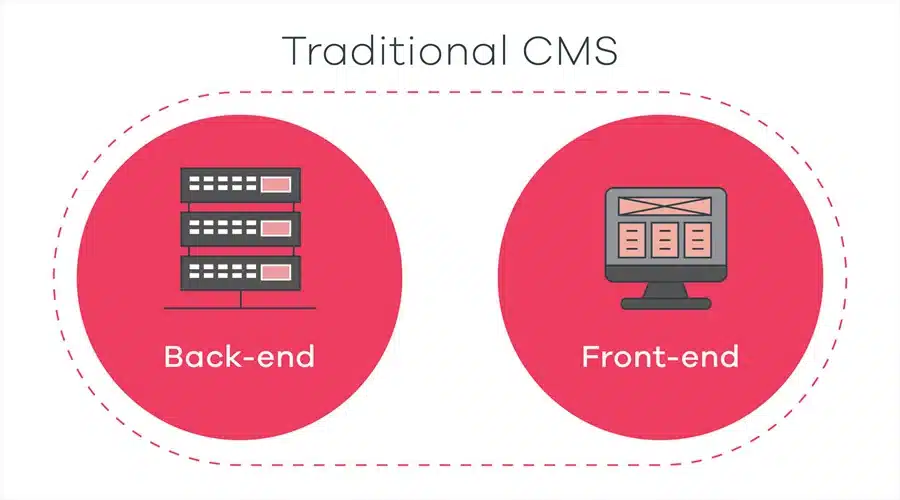
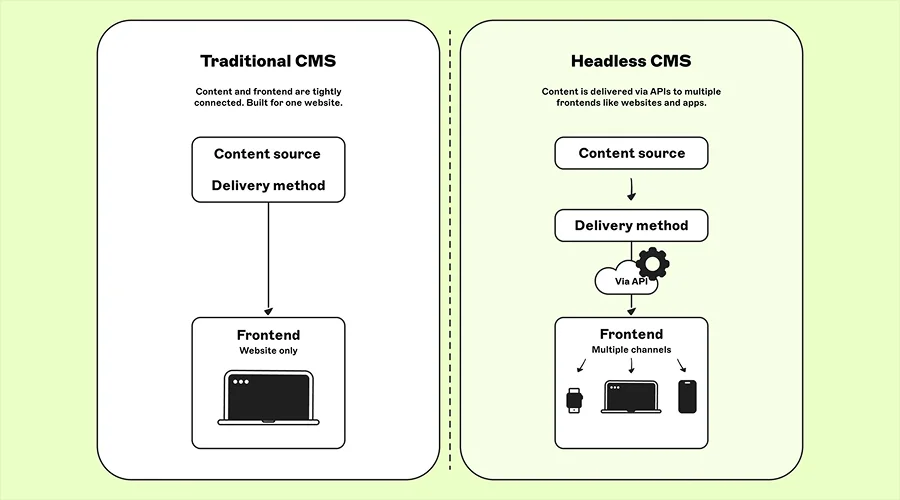
A traditional CMS is the one that manages both the content and the website’s presentation in one place. You don’t need separate systems to manage and display content in traditional CMS. WordPress is one of the most popular examples of traditional CMS. These platforms provide you an admin panel where you can create pages, upload images, write blog posts, manage menus and control how your website looks. The CMS then connects this content to the website visitors see. In this setup, everything works together, making it simple to use for small businesses, bloggers, news websites and so on.
Headless CMS – What Is It?
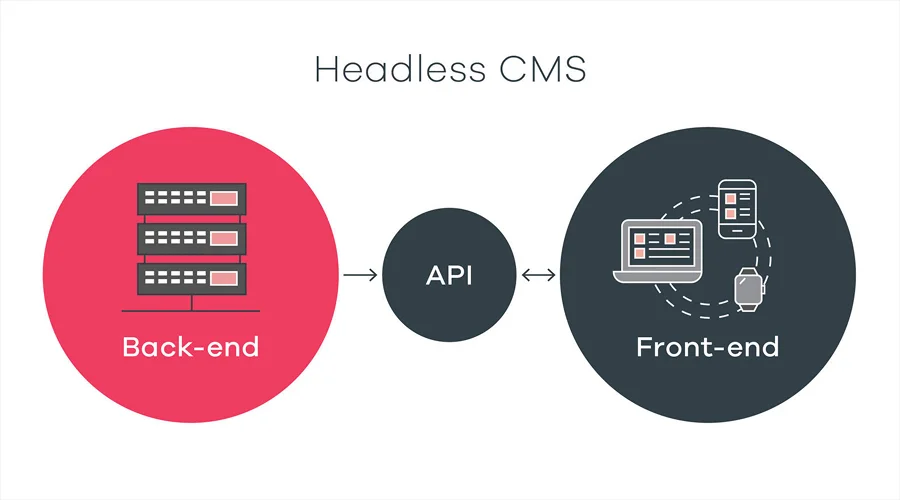
A headless CMS, on the other hand, separates the content from the part of the website that displays it. A headless CMS stores and manages content in one place, but it can be delivered to different platforms.
For example, a company uses a headless CMS to manage product information. The same product details can then appear on its website, mobile app and online store without creating the content separately for each platform. Headless CMS gives developers more freedom to decide how the content should look and work on each platform.
Let’s now look at the key differences and understand which option is best for you.
Headless CMS vs. Traditional CMS: A Quick Comparison
Features
Traditional CMS
Headless CMS
Content and design
Connected
Separated
Ease of Use
Easier
Require technical knowledge
Website Building
Provide built-in tools
Built using front-end tools
Flexibility
Good
Highly flexible
Speed & Performance
Can become slower
Speed is enhanced with lightweight front end
Multiple Platforms
Limited
Excellent
Development Time
Faster
Take time to build
Customisation
Good
Highly customizable
Ideal For
Small business, bloggers, business websites, smaller projects and so on
Large, complex, multi-platform projects
Headless CMS vs Traditional CMS: Key Differences in Detail
Here are some of the most significant differences between headless CMS and traditional CMS. Take a look…
1. Content & Design Separation
The two CMS differ greatly based on how content and design are handled. A traditional CMS combines content management and website presentation. A headless CMS, on the other hand, keeps them separate.
2. Ease of Use
Traditional CMS is much easier to use. These platforms allow users to create pages, publish articles, change themes, install plugins and manage many website functions without writing code.
A headless CMS, on the other hand, is easier to use for managing content; however, it takes a lot of time and effort to build and maintain the website because the content system and website are separate.
3. Flexibility
When it comes to flexibility, headless CMS platforms is a clear winner. With a traditional CMS, you work within the platform, theme and plugin structure. You get customisation options but they are very limited. A headless CMS, on the other hand, gives developers much more freedom. They can build the front end using the tools and technologies that best suit the project.
4. Speed and Performance
When it comes to website speed there are several factors that come into play. A traditional CMS can become slower when a website has too many plugins, large images, poorly written code or an overloaded hosting setup. A headless CMS can deliver content efficiently with a lightweight front end. However, it still needs proper development and hosting to perform well.
5. Search Engine Optimization (SEO)
Both the platforms work well for search engine optimisation.
A traditional CMS often makes SEO easier for beginners. Plugins and built-in settings let users manage titles, descriptions, URLs, sitemaps and other basic SEO features without much technical knowledge. A traditional CMS makes every day SEO tasks easier for small businesses.
SEO in headless CMS depends largely on how the website is built. It undoubtedly gives developers more control but at the same time they also get more responsibility. This makes it useful for businesses with experienced development teams.
6. Cost
Pricing of both the platforms differ significantly. Traditional CMS platforms turn out to be less expensive choice because many tools, themes and plugins are readily available.
Headless CMS projects; however, require a larger initial investment. This is because the website is build using front end. Aside from that, ongoing costs also vary depending on the CMS, hosting, development team and number of platforms being supported.
Well, both the headless CMS and traditional CMS are the best content management platforms. Choosing the best heavily depends on your needs and ultimate goal. A traditional CMS is often the better choice for those looking for a straightforward website that is easy to manage. It saves time, reduces development costs and let users handle everyday website tasks without experts by their side.
A headless CMS, on the other hand, can be a great option for those who want to have greater control, multiple digital platforms and a highly customised experience. The idea here is to choose the one that fits your requirements the best, instead of choosing something that is new or more advances. If you do so, you won’t be able to fetch the right results.
If you want a simple business website, a traditional CMS is the best choice for you. However, if you have a large and growing digital operation, then a headless CMS makes the best option.
The Bottom Line
So, this is all about headless CMS vs. traditional CMS. Hopefully, this article has been informative for you and helped you choose the right CMS for your business. When it comes to choosing between these two, you should always pick the one that solves your problems without creating unnecessary ones. If you have a small team without much technical experience, a traditional CMS may therefore be the more practical choice.