Power BI enters a DevOps-first era in 2026. With PBIR as the default new format, native Git integration, and deep automation hooks, analytics teams can finally get consistent CI/CD pipelines, auditable deployments, and scalable governance without worrying about slow insight delivery for leadership.
For years since its introduction, Power BI has operated in parallel to mainstream engineering workflows. Developers used to use Git, pipelines, and automation and BI teams relied on sharing files and manual publishing. Power BI’s 2026 update is here to fix that divide
Microsoft rebuilds Power BI around DevOps principles as reports are now source-controlled assets. Deployments follow pipelines instead of clicks. Automation replaces tribal knowledge. The new update makes analytics behave more like software and not a side tool.
This shift is going to be massive because analytics drives decisions at the same velocity as applications. When reporting lag engineering disciplines, organisations accumulate silent risk. Power BI 2026 removes that mismatch.
DevOps-Focused Technical Details
Area
Power BI 2026 change
Practical impact
Source Control
PBIR + Git integration
True diffing, branching, and reviews
CI/CD
Folder-based report structure
Automated validation and deployment
Automation
Copilot + MCP servers
Programmatic model changes
Governance
Standardised formats
Predictable promotion across environments
Platform
Fabric capacity alignment
Unified data and analytics pipelines
Deprecations
Legacy Q&A, embedded scripts
Reduced attack surface and tech debt
The PBIR File Format Becomes the Backbone of CI/CD
The new PBIR file format replaces the monolithic binaries with a modular, text readable structure. Each visual and layout component now lives as a discrete artifact.
This design unlocks automation as CI systems can now inspect changes without opening Power BI. Pipelines can block deployments when measures violate naming standards or performance thresholds thus, making version history useful.
Timeline matters here. By early 2026, new reports will default to PBIR and by mid-year the Desktop app will follow suit. By GA, legacy formats lose support entirely so DevOps adoption is no longer optional for enterprises.
In essence, PBIR turns Power BI into something that Git understands and this single change enables everything else.
Git Integration Ends the “Last Save Wins” era
Native Git integration inside the Power BI 2026 update reshapes how teams collaborate. Devs no longer need to overwrite each other’s work. Feature branches isolate experimentation. Pull requests force review. Merges happen intentionally and not accidentally.
Accountability is also affected here. Every change links an author and a timestamp so traceability increases. Git integration also encourages discipline. Teams start defining branching strategies for analytics. Report notes include report changes. Analytics development stops feeling informal.
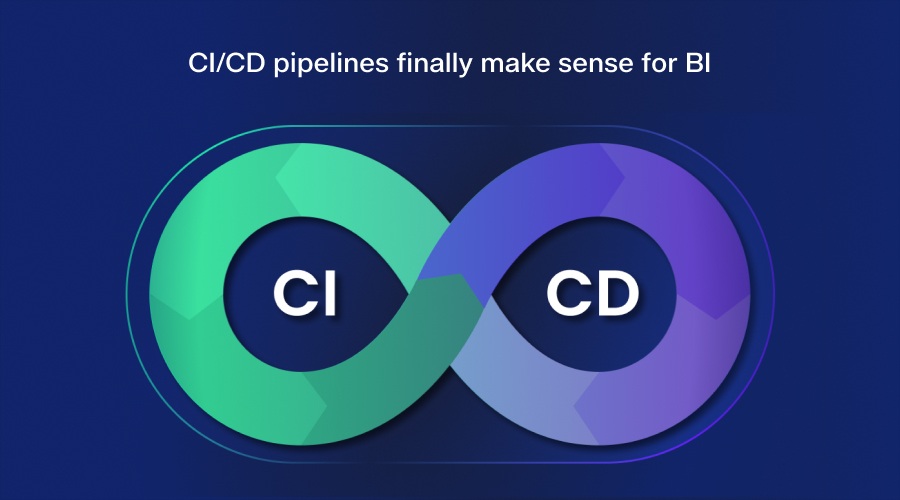
CI/CD Pipelines Finally Make Sense for BI
Image Source Incredibuild
Before 2026, CI/CD for Power BI felt more bolted-on rather than feeling at home. Pipelines did exist, but formats resisted automation. Thanks to the PBIR introduction, this problem has now gone.
In the Power BI 2026 update, a typical pipeline looks familiar to engineers:
Commit report changes to Git
Run automated checks on semantic models
Validate DX and metadata
Deploy to test environments
Promote to production after approval
This updated approach helps eliminate all manual publishing errors and also reduces downtime caused by untested changes. And this becomes even more important for enterprises as it reduces operational risks. Analytics failures can now follow predictable failure models and not end up being a surprise for the execs during a meeting.
Automation Expands Beyond Deployment
Image Source freepik
The latest 2026 update now allows automation into modeling and maintenance. Model Context Protocol or MCP servers now allow AI agents and scripts to interact with semantic models. Tools can read the scheme, generate measures, and apply the best practices programmatically.
This opens new workflows allowing teams to automate bulk refactoring and do run nightly governance checks without breaking a sweat. KPI definitions now update across hundreds of reports without needing any manual edits.
Copilot Replaces Legacy Q&A in DevOps Workflows
The retirement of the old Q&A feature is a signal towards a broader philosophical shift in the industry. Power BI consolidates intelligence around Copilot. So now Copilot does more than answer basic questions like a chatbot. With the latest update, Copilot can now generate DAX and understand model context. Copilot can even integrate with Fabric and MCP workflows. Looking at it from a DevOps perspective, this matters because Copilot now becomes an interface layer. Analysts simply describe their intent and Copilot does it with validated logic. Teams can review and commit changes like any other code.
This workflow is aimed at reducing rework and standardizing modeling patterns across teams, even when skill levels differ.
Fabric Capacity Unifies Data and Analytics Pipelines
Power BI 2026 continues the transition from standalone Premium capacity to Microsoft Fabric and this shift is to align analytics DevOps with data engineering DevOps.
Fabric capacity brings ingestion, transformation, modeling, and reporting under one umbrella. Pipelines can orchestrate across layers without handoff. For DevOps teams, this greatly simplifies the architecture. One capacity, one governance model, and one monitoring surface.
Licensing changes force planning, but the technical outcome favours coherence. Analytics pipelines stop fragmenting across tools.
Governance Improves Through Constraint
At first glance, some of the Power BI 2026 changes feel restrictive. R and Python visuals are disappearing from embedded scenarios so are metric sets. Legacy formats are all set to retire with this latest Power BI update. For DevOps, these changes reduce entropy. Every unsupported feature removes a branch of technical debt. Governance becomes enforceable because formats all across stay consistent. Automation works because variability drops.This tradeoff with the latest update favors scale which can be super helpful for larger organisations.
DevOps for Visual and Presentation
Image Source freepik
Visual consistency is vital for this new update. Power BI upgrades cards, images, and matrices and standardises formatting control. All of this is aimed at supporting automation. Themes are going to apply cleanly and brand standards will be enforced centrally.
Pipelines can validate visual metadata. Reports deployed across regions maintain identical presentation logic. This reduces friction for every team.
Migration Planning Becomes a DevOps Project
Adopting Power BI 2026 will need deliberate migration on your part. PBIR conversions, Git onboarding, and Fabric alignment will need massive coordination between teams. And successful teams are going to treat these migrations just as any other task. Stage rollouts and test compatibility. They train developers and analysts together. DevOps maturity does not happen over time and Power BI 2026 is bringing all the tools needed to do this.
What DevOps Maturity will Look Like in Power BI 2026
In mature environments, analytics teams operate predictably:
Every report lives in Git
Every change flows through pipelines
Every deployment leaves a trace
Every KPI originates from a governed model
Thanks to this, incidents will decrease as analytics earns trust as infrastructure, and not through experimentation.
The Larger Implication
The Power BI 2026 update is not another update to modernise reporting. This massive shift aims at aligning analytics with how modern software ships. CI/CD, Git and automation become the new default with the latest update. And organisations cannot ignore this shift unless they want to risk obsolescence. And it is this transformation that defines the real value of Power BI in 2026.