Power BI 2026 is changing how reports get built, stored, and managed. The PBIR file format now becomes the new default with the latest update to reshape version control, collaboration, and deployment. We see why this change matters so much for teams and how to prepare for the migration.
Power BI is rarely seen making significant changes. And when it does, the effects tend to ripple for a long time. 2026’s update brings on a fresh new file format with the PBIR file format. Microsoft is not introducing any visual tweaks this year, but is really reshaping how Power BI works behind the scenes.
PBIR is short for Power BI Enhanced Report Format. This is the new default format for all reports created and edited from early 2026 onward. This is a massive decision that closes the era of legacy report metadata and pushes Power BI fully into modern development workflows. The impact of this is most likely to reach individual analysts, enterprise BI teams, and DevOps pipelines alike.
This change might seem invisible but has some huge implications. Let’s learn more on them.
What PBIR is actually changing
PBIR will replace the legacy report metadata format inside .pbix files. The old formal bundled everything into one single opaque structure. That design made Power BI approachable but also made it very fragile.
With PBIR, you get to take a different path. It will store report definitions as structured, text-based components. These components will work with the broader Power BI Project (PBIP) architecture. The key difference here is that BI will now be able to treat assets more like software and less like documents.
Core characteristics of PBIR
Text based report metadata that tools can read and track
Modular structure instead of a single binary blog
Full compatibility with source control systems
Programmatic access through scripts and APIs
This shift changes how reports are made, reviewed, and shipped. Not how reports render or how data behaves.
When is the switch happening for Power BI?
Microsoft has announced a clear rollout window. And this will be done in phases. Early 2026 will see Power BI service begin to create all new reports using PBIR by default and all the existing service reports will be automatically converted to the new format anytime someone edits and saves them.
Power BI Desktop will follow suit soon. From the March 2026 release onward, Desktop saves new and edited reports using PBIR. But teams do have the option to opt out during the preview window with Power BI Desktop.
General Availability arrives later in 2026. At this point, PBIR will become the only supported report format. This is when your legacy metadata stops receiving support and automatic conversion will apply universally.
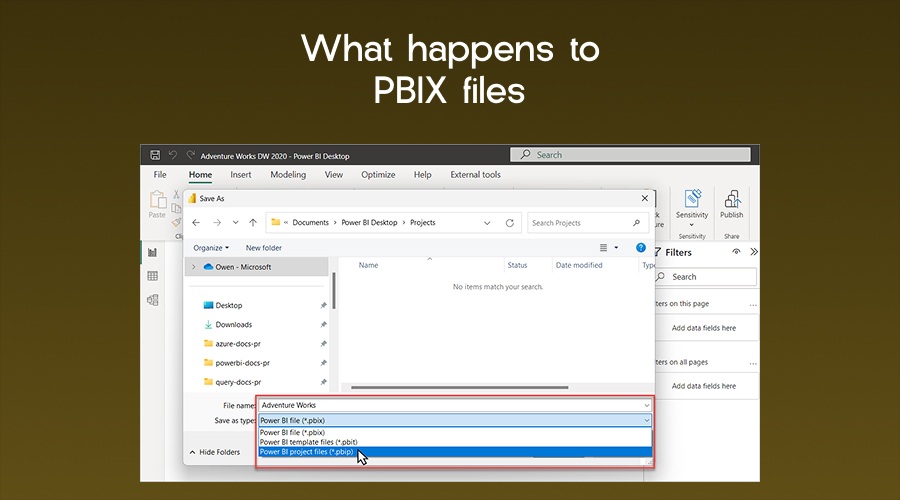
What happens to PBIX files
Image Source Microsoft Learn
The .pbix file stays the same. This detail is important to remember. PBIX remains the primary container for Power BI reports so users will not need to abandon existing workflows or file extensions. The change happens inside the file.
Instead of embedding legacy report metadata, PBIX files store PBIR metadata to create parity between PBIX and PBIP structures. But the familiar user experience remains the same.
For analysts who work alone and avoid source control, daily work will feel unchanged. For teams that manage dozens or hundreds of reports, the internal shift will unlock long requested capabilities.
Why Microsoft forced this change
Image Source Canvas Intelligence
There is no hiding the fact that Power BI outgrew its original design. The platform that first started off as a self-service reporting tool has now ballooned into a central enterprise analytics layer. But the development practices never fully caught up with this transformation. Teams often struggled with version conflicts, manual deployments, and super brittle release processes.
Problems PBIR solves at scale
Version history no longer relies on the file copies
Multiple developers can work on the same report safely
Automated deployments stop being workarounds
AI tools gain structured access to report definitions
The addition of PBIR was not an experiment by Microsoft. It was indeed much needed. This is Microsoft’s push toward Fabric and DevOps integration, along withAI assisted development. This default switch confirms long term intent.
PBIR and modern development workflows
With the introduction of PBIR into the mix, Power BI reports stops behaving like documents and more like code.
Easier source control
Text based metadata enables the integration of Git systems to track line-level changes. Themes can now easily review pull requests or even compare revisions without having to reverse engineer the binary files. Tracing ownership also becomes easy.
Stable CI/CD pipelines
PBIR integrates very easily with automated deployment flows. Pipelines can validate report definitions, deploy across environments, and roll back safely when issues surface.
Collaboration stops breaking files
Devs will no longer need to look out for each other. Separate components reduce merge friction which makes conflicts easy to manage. Things do not get destructive.
Opt out options and the limits
Microsoft allows temporary opt outs during this preview period giving admins the choice of disabling these automatic conversions of legacy files from the tenant settings. Desktop users have the option of turning off preview features altogether. But remember, this switch is inevitable.
Once PBIR reaches General Availability, opt outs will not be an option anymore. All reports will convert automatically. So teams that rely on this delay as a strategy risk unplanned disruptions later on. Preparation will work much better than resistance in this case.
Does PBIR really matter for professionals?
The introduction of the new PBIR format is going to change expectations in the job market. Employers love Power BI and want to treat it more like a development discipline, not just a mere reporting task.
Skills that will be in high demand
Version control applied to BI assets
CI/CD concepts adapted for analytics
Report automation through APIs
Structured collaboration across teams
Candidates who understand PBIR can explain report lifecycles better, not just flaunt pretty visuals. And this distinction will matter a lot for senior roles.
Interviews are already seeing a reflection of this shift. Hiring managers ask how candidates manage deployments, reviews, and rollbacks. PBIR provides the foundation for credible answers.
Impact on organisations
PBIR influences governance and risk as much as productivity.
Governance benefits
Clear audit trails for report changes
Reproducible deployments across environments
Reduced dependency on manual publishing
Risk reduction
Much fewer accidental overwrites
Faster recovery from broken releases
Improved visibility into production changes
Preparing for the PBIR transition
You will need intent and structure for a successful transition to the new file format. Things cannot change all of a sudden, so preparation is going to be key.
For individuals
Enable PBIR in a test environment
Explore the file structure of the converted reports to get acquainted
Learn basic Git operations tied to report changes
Get a basic understanding of how the new PBIR file format is going to store visuals, layouts, and metadata,so you are fully confident before production work begins.
For teams and enterprises
Inventory existing reports and dependencies
Define branching and review standards early
Train analysts on collaborative workflows
Teams need to establish standards much early on if they want to avoid chaos, and experts too are suggesting to start with the transition early.
Common misconceptions about PBIR
Image Source Datavetaa
PBIR often gets misunderstood as a performance feature or licensing change. It is neither. Runtime performance will remain unchanged. Licensing will remain the same. The gains only appear during development, deployment, and maintenance.
Another misconception has to do with reversibility. Once reports convert and evolve in PBIR, moving backward becomes impractical so you need to treat this conversion as a forward-only step.
The connection to PBIP
PBIP will serve as one part of the broader Power BI Project format. PBIP group reports, datasets, and configuration into a project structure. PBIR reaching default status accelerates PBIP adoption. And together, they form the backbone of enterprise grade Power BI development in 2026 and beyond.
What happens if you ignore the update
Ignoring is not advised here. Reports will convert automatically when you edit them. teams encounter unfamiliar structures without preparation. Collaboration gaps widen between early adopters and late movers.
If you avoid PBIR, you risk falling behind in the race. Organizations that postpone planning absorb disruption under pressure instead of on their own terms.
A structural shift for Power BI
The upgrade to the newest format does not bring on any visual flair and pushes Power BI into alignment with how modern software gets built, reviewed, and shipped. Analysts get structure and teams get more control.
And this transition will reward only those who are prepared. All your reports will still look the same but the way they live is going to change completely.
Understand that difference defines your readiness in the Power BI world moving forward.