Power BI 2026 plugs intelligence directly into analytics. AI now helps discover patterns, explains drivers, predicts outcomes automatically and much more. Analysts shift from building dashboards to shaping decisions. Businesses act faster because insights surface exactly when they matter the most.
Power BI is no longer just a tool that explains the past. In 2026, it exists to influence what happens next. The role of the data analysthas shifted entirely. Modern businesses are no longer rewarding teams for building visually polished dashboards that describe yesterday’s numbers. They now expect systems that surface risks early, explain causality clearly, and even suggest direction without waiting for manual exploration. Power BI’s AI evolution is here to fulfil that demand.
The platform’s intelligence layer now works as an analytical co-pilot. One that scans data continuously, highlights what is important, and explains why it matters for your business context. This change does not replace human judgment. It simply removes the mechanical work that used to delay it.
From Reporting Tools to Decision Systems
Image Source ChartExpo
Earlier versions of Power BI used to have a huge focus on the accessibility side of things. Drag and drop visuals, self service modelling and cloud sharing helped lower the entry barrier for almost everyone. With this update, accessibility remains important, but relevance matters even more.
Modern organisations are often overwhelmed with data signals like sales fluctuations, operational issues, financial anomalies and a whole lot more. These things can happen faster than any human can track. So Power BI’s AI features are here to fill in the gap. Instead of asking users to hunt for insights, the platform now brings insights front and centre. This is a subtle shift that really changes how teams work. Analysts are spending way less time now searching and more time validating, contextualising, and acting.
Smart Data Discovery
Smart data discovery in Power BI 2026 doesn’t feel like a feature toggle to turn on or off. It now behaves more like a background process that is constantly evaluating your datasets.
The AI scans relationships, distribution, as well as trends across connected sources to identify statistically meaningful patterns and visualises them without predefined queries. Users can then see correlations, breakdowns, and emerging trends the moment data refreshes.
This matters so much because most missed insights never fail analysis. They never get analysed at all. Smart discovery helps to reduce blind spots by ensuring exploration does not depend on curiosity alone.
This same intelligence flows across the Microsoft ecosystem. Data stored in SharePoint lists, Teams activity logs, and connected services receives the same automated treatment.
Natural Language as an Analytical Interface
It is no secret that over timenatural language query has gotten so good that it now feels natural. Users can directly ask their questions and instantly get structured answers. The system understands all your business terminologies, synonyms, and contextual intent with much greater consistency. It translates everyday language into analytical logic. This capability changes who participates in the analysis. Execs, product managers, and operations teams no longer need to rely on intermediaries to get simple answers. Data is presented directly during meetings and reviews thanks to AI.
For analysts, this does well to remove low value interruptions. No longer do they need to spend time on repetitive questions that automation can handle instantly. Their focus shifts to framing strategy and validating the results.
Anomaly Detection that Prioritises Attention
Image Source Microsoft Learn
Most of your datasets will be hiding anomalies in plain sight. Gradual drifts and subtle spikes escape dashboards designed for averages. Power BI’s anomaly detection lets the system monitor time-series data continuously and flag any deviations from expected behaviour. This explains why the deviation matters and what variables are likely responsible for it. This context prevents alert fatigue nd accelerates response.
In operational environments, this intelligence is able to detect inefficiencies before they get a chance to escalate into something big. In finance, it surfaces irregular transactions early. In digital commerce, it highlights demand shifts while response windows still exist.
Anomaly detection is not here to replace human review. It just makes sure that human attention lands where it delivers the biggest impact.
Key Influencers to Explain Cause
Data rarely fails because it lacks metrics. In most cases, it fails because teams cannot explain why metrics change.
With Power BI 2026, you get access to the Key Influencers visual to tackle this problem head on. It evaluates variables across a dataset and identifies which factors have the strongest influence on an outcome. The system quantifies impact instead of relying on intuition. This one capability is what transforms performance reviews and planning discussions. Teams move from speculation to evidence-based explanations. Decisions gain credibility because the drivers are visible and measurable.
Key influencers work perfectly well with complex datasets where you have multiple variables interacting with each other. It helps reduce analytical guesswork and shortens the path from insight to action.
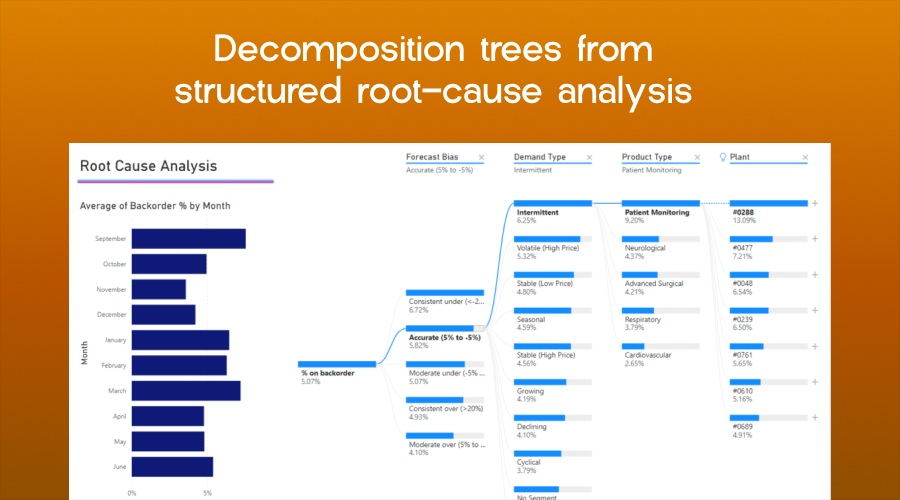
Decomposition Trees from Structured Root-cause Analysis
Image Source Microsoft Learn
Root-cause analysis often fails due to unstructured exploration. Analysts drill randomly and hope to stumble onto explanations. The decomposition tree replaces this randomness with guided exploration. It breaks a metric into contributing dimensions and suggests optimal paths based on data signals. Users follow evidence instead of instinct.
It is this structured approach that accelerates problem resolution as analysts can now uncover the combination of region, product, channel, or time period responsible for the change without manual trial and error.
The visual also supports ad hoc analysis. Teams explore hypotheses in real time during discussions to turn boring meetings into analytical working sessions, not just simple status updates.
Sentiment Analysis without Codes or Pipelines
Text data used to sit outside mainstream analytics due to processing complexity. AI with Power BI solves that. Sentiment analysis now runs directly within reports, classifying text as positive, neutral, or negative without custom scripts. Customer feedback, survey responses, and support tickets now have become quantifiable signals. This matters because sentiment shifts often precede behavioural change. Declining sentiments warn of churn before revenue drops.
Improving sentiment validates product improvements before adoption metrics catch up. When you integrate sentiment into standard dashboards, Power BI aligns emotional data with operational and financial metrics to produce a more complete picture of performance.
Forecasting
Power BI 2026 treats forecasting as an operational input. The platform generates forward looking projections directly from historical data. More importantly, it frames forecasts alongside influencing variables. Users see what drives outcomes and where intervention can change trajectories.
This approach shifts forecasting from being a passive prediction to active planning. Teams use projections to test decisions, allocate resources, and adjust strategy with confidence. So your forecasts no longer sit at the end of reports. Instead, they now begin conversations.
Automated Machine Learning
Automated machine learning in Power BI reduces complexity without hiding accountability. The system builds, trains, and evaluates models using proven algorithms. Analysts define objectives and interpret results without managing infrastructure or hyperparameters. This balance preserves analytical rigour and eliminates operational friction.
AutoML supports practical use cases that matter to your business. Sales forecasting, churn prediction, fraud detection, and demand planning move from specialised teams into mainstream analytics workflows.
The value lies not in automation itself but in accessibility. Organisations deploy predictive analytics without expanding headcount or delaying delivery.
Analytics that Adapts as Data Evolves
Image Source Itequia
When you are working with static models, these tend to degrade over time. Power BI’s AI adapts as patterns change. Anomaly detection algorithms retrain as the dataset grows and machine learning models refine predictions with this new data. Natural language understanding improves as terminology evolves.
This adaptability means much more in volatile environments. Markets shift, customer behaviour changes, and operational constraints fluctuate. Analytics systems must evolve at the same pace.
Power BI 2026 embeds learning into the platform itself, which improves insight quality with use.
Collaboration Amplified by Shared Intelligence
Image Source Ajelix
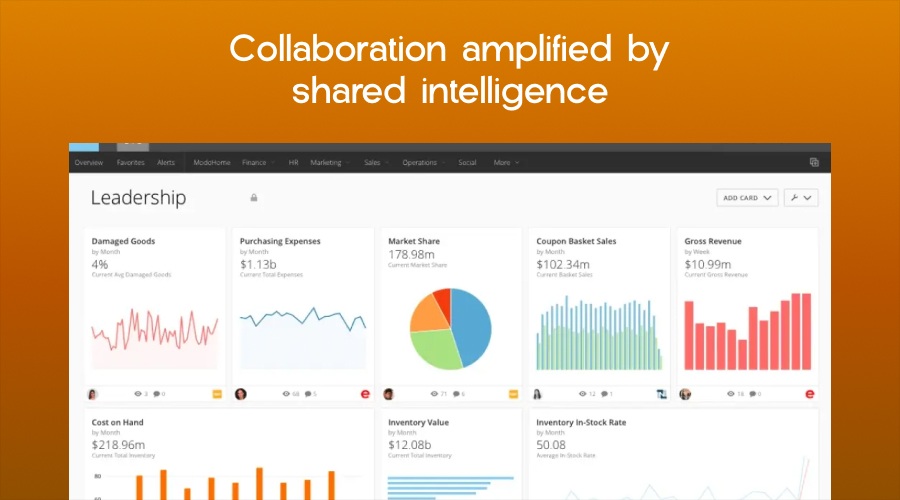
AI driven analytics changes the entire collaboration dynamics as teams no longer need to debate about which numbers matter the most. The system offers priority signals consistently across users. Discussions shift from alignment to action.
Power BI Service extends this intelligence across devices and teams. Shared dashboards carry the same AI insights whether viewed in browsers, mobile apps, or even in embedded environments. Decisions stay synchronised across all organisational layers.
Integration tools like Teams and Excel ensure analytics remain present where the real work happens. Insights arrive in context instead of demanding attention shifts.
Why Smarter AI Changes the Analyst’s Role
Don’t think of Power BI’s AI evolution to be a replacement for analysts. It instead raises the bar for their contribution. Analysts move away from manual exploration and report maintenance. Now they can focus more on interpretation, governance, and decision framing. Their value increases because automation handles all the repetitive tasks that once consumed a whole lot of time.
This shift also changes skill priorities. Analytical thinking, business context, and communication matter more than mechanical tool usage. Power BI 2026 rewards professionals who understand outcomes, not just visuals.
The Impact of AI on Power BI 2026
Smarter AI in Power BI is here to compress the distance between data and decision. Automation accelerates discovery and exploration builds trust. Prediction enables intervention. Together, they transform analytics to become a strategic capability.
And organisations that adopt these capabilities do not move faster because they work harder. They move faster because they have deployed systems that think alongside them. Power BI 2026 proves that the future of analytics belongs to quieter AI systems that surface the right insight at the right moment. Without being asked.